Facial recognition has become second nature on smartphones, unlocking everything from banking apps to email accounts with a glance. But despite being baked into Windows since version 10, Windows Hello’s facial recognition hasn’t reached many desktop PCs, largely because most desktop webcams—if present at all—simply don’t support it.
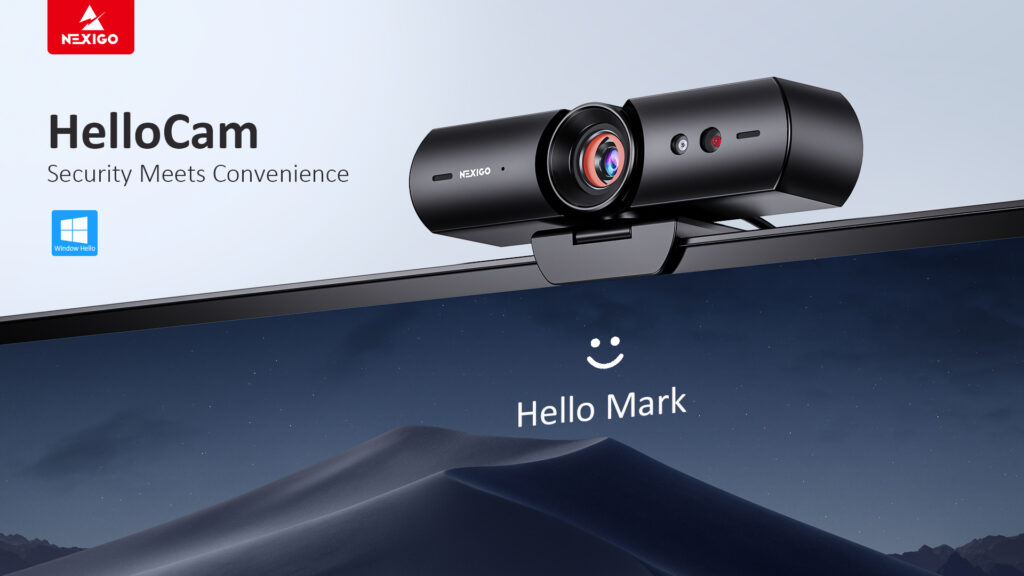
Enter the NexiGo HelloCam, a compact webcam that brings full Windows Hello support to your desktop for just $56 on Amazon—a 20% discount for Prime Day. And while it may seem like just another camera, the HelloCam delivers much more than just better video calls.
Most laptops include a built-in webcam with Windows Hello functionality. But if you’re on a desktop—or if you’ve upgraded to a nicer USB webcam without biometric support—you may not be taking advantage of what Windows Hello can now do. Traditionally, it has been used to unlock your PC with your face, offering a quick, secure, and password-free login. But now, Hello’s capabilities have expanded to the web, supporting passkeys that let your face become the secure key to unlock websites like Amazon, Gmail, or your bank.
Setting up a passkey is surprisingly simple. After logging in to a site using your password, you can tell the site to remember you via Windows Hello facial recognition. From then on, no more entering your credentials each time—just glance at your webcam. It’s a huge upgrade in both convenience and security.
To take advantage of this, you’ll need a webcam with Windows Hello infrared sensors, like the NexiGo HelloCam. A few years ago, this kind of feature would have easily cost over $100. Today, there are budget-friendly options—and NexiGo’s model stands out. It’s a 1080p webcam with privacy shutter, basic facial/audio enhancements, autofocus, and a small ring light. It’s not top-tier for video quality, but it’s one of the most affordable and widely recommended Hello-enabled webcams on Amazon.
There’s also a cheaper Windows Hello option, like the Toallin webcam around $30, but reviews suggest the image quality isn’t quite as strong.
Before you buy, double-check whether you need it. If you have a laptop, open Settings and search for “set up face sign-in.” If your webcam supports Windows Hello, Windows will walk you through setup—no new gear required.
But if you’re on a desktop or upgrading, the NexiGo HelloCam is a steal this Prime Day. It’s more than a webcam—it’s a small, affordable way to make your PC more secure and a lot more convenient.