Hardware acceleration uses specialized hardware components of your computer to perform certain tasks more efficiently than the system’s main processor (CPU) alone could. This is particularly useful for graphics- or audio-intensive tasks where specialized hardware such as the graphics (GPU) or audio processors can improve performance.
A succinct example is graphics processing. Instead of burdening your CPU with calculating every single pixel, the GPU takes over this task and enables a smoother and more appealing graphical display.
Activating hardware acceleration is often a simple but effective way to improve system performance. In Windows 11, for example, you can do this via the desktop context menu. Right-click on the desktop and select “Display settings” and then “Graphics” under “Related settings.” Under “Change default graphics settings” you will then find the function you are looking for as “Hardware-accelerated GPU scheduling.” If, contrary to expectations, the option is not active, rectify this and restart the PC.
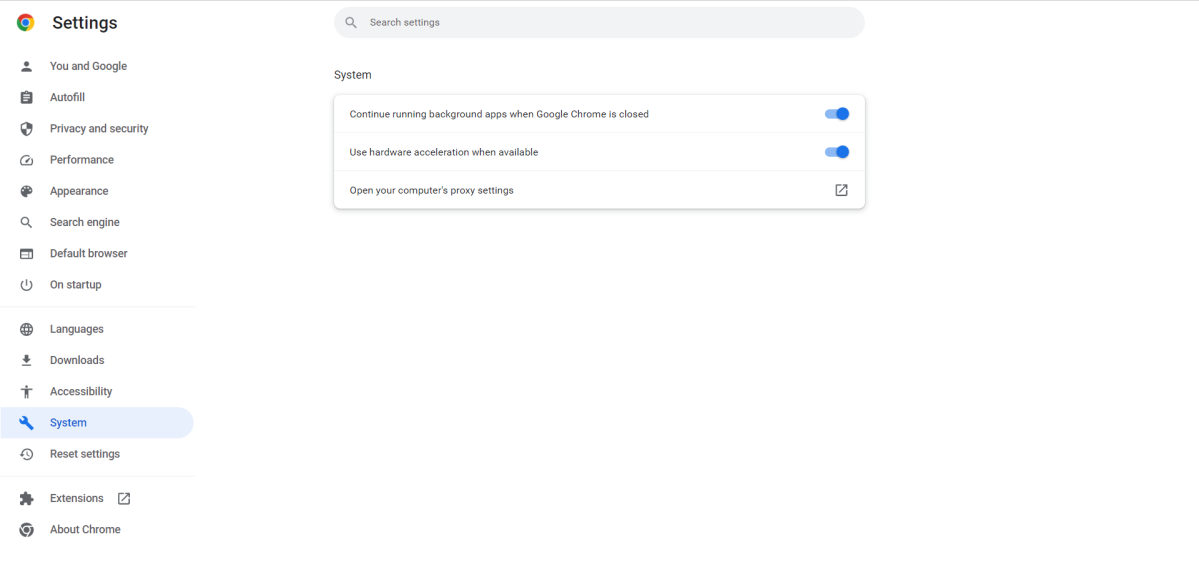
In other applications such as web browsers or multimedia players, you will often find an option to activate hardware acceleration in the settings menus. In Google Chrome, for example, you will find the function under “Settings” and the “System” section. Here you can switch on/off the slider to “Use hardware acceleration if available.”
Marshall Gunnell/IDG
But be careful: Not all systems benefit from hardware acceleration. In some cases, it can even lead to performance problems or instability. It is therefore advisable to check the effects of activated hardware acceleration on your system and ensure that all drivers and programs are configured correctly.
Hardware acceleration is a powerful feature. Used correctly, it can significantly improve your system performance. With a few clicks and the right configuration, you can ignite the turbo.