

Never lose track of your files again.
With Windows 11’s KB5037853 update, Microsoft added a function to Explorer that allows you to copy and move files within a folder path by simply dragging and dropping. Sounds easy, right? Well, it is! This is great news, especially if you’ve got loads of files on your computer. We’ll show you how to take advantage of this new feature.
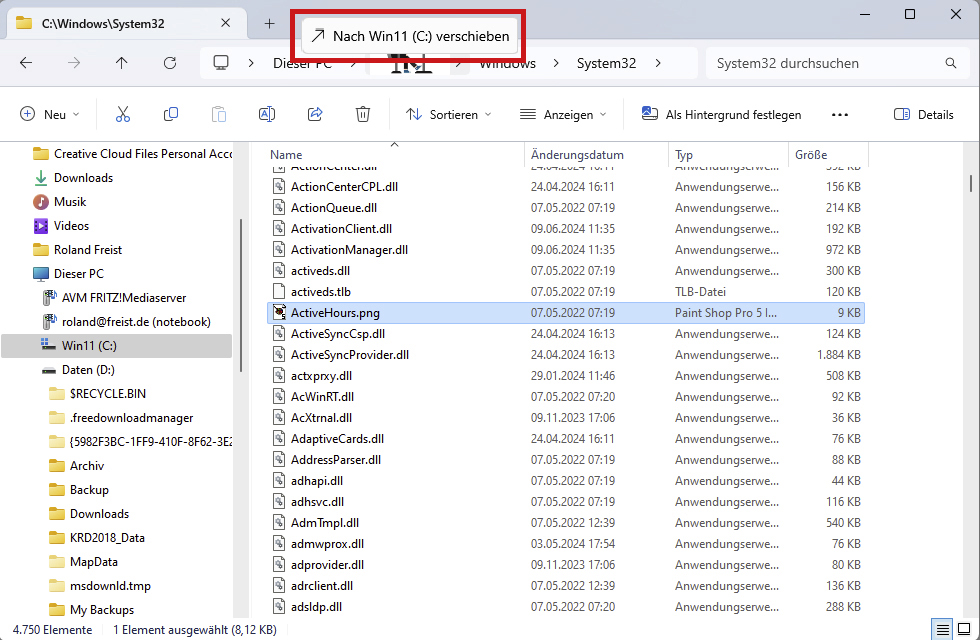
To move files using Explorer’s file paths, use the breadcrumb navigation of the Explorer in the address bar. Breadcrumbs is a design pattern for the layout of a graphical user interface. It’s normally a line of text that indicates where you are in a branched folder structure.
IDG
Explorer displays this information at the top under the address bar. An entry such as This PC – Win11 (C:) – Windows – System32, for example, tells you that you are currently in the System32 folder, a subfolder of Windows on the C: drive in This PC.
This line contains four breadcrumbs. You can now easily move a file from System32 to the Windows folder by dragging the file onto this breadcrumb with the mouse. To copy the file, press the Ctrl key.

