

Looking to customize the look of the Windows taskbar? We’ll guide you every step of the way.
Ah, the taskbar. It’s a vital part of the Windows operating system. It’s the place to go when you want to change the date and time, check the weather, and so much more. If you’re looking to change the color of said taskbar, you’ve come to the right place. Although Windows automatically selects a color for the taskbar (usually black or white), there’s a way to set a fixed hue and we’re going to tell you how to do it.
How to change the color of the Windows taskbar
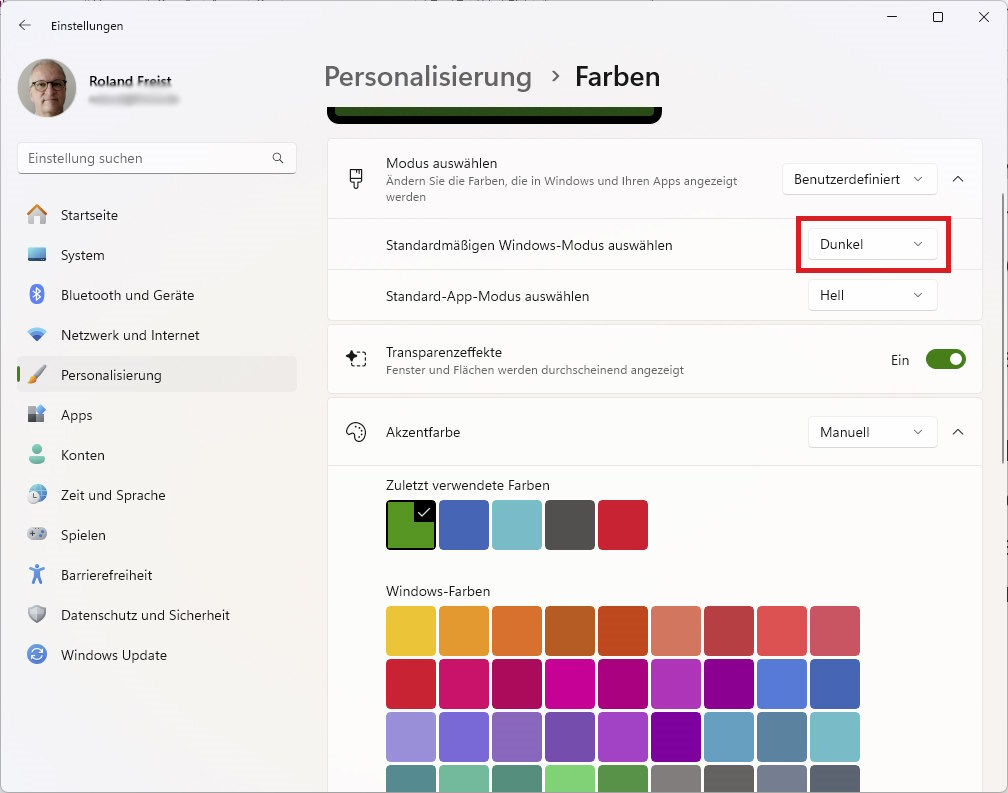
Open the Windows Settings via the Start menu and click on Personalization and then Colors. In the menu next to Select Mode, set the option Custom and change Select Default Windows mode to Dark–you can only select the color of the taskbar yourself in dark mode.
Scroll down and click on a color field that you like under Windows colors. If you can’t find anything here, click on the Show colors button next to Custom Colors and select a hue from the color field.
After clicking on Done, it will appear in the previous window in the Recently Used Colors row. Now scroll down a little further and set the switch for Show Accent Color on Start and Taskbar to On.
The taskbar and the background of the start menu will now appear in the selected color.
IDG
Alternative: With the help of the Translucent TB tool, it’s possible to make the taskbar completely transparent and therefore invisible. After installation, click on the tool icon at the bottom right of the taskbar and select Desktop and then Clear.
You can assign any color to the taskbar via Accent Color. The menu items Visible window, Maximized window, Start Opened, and Task View Opened can be used to determine the appearance of the bar when opening windows, the Start menu, or the Task View.